I recently needed to make a landing page using a placeholder image for a site. I wanted their logo image to be vertically and horizontally centered in the browser.
My first thought was to give the image element the class “centered” and then style that class using my CSS stylesheet:
.centered {

position: absolute;

top: 50%;

left: 50%;

}
What that accomplishes is putting the upper left corner of image exactly in the center of the page, not the center of the image in the center of the page.
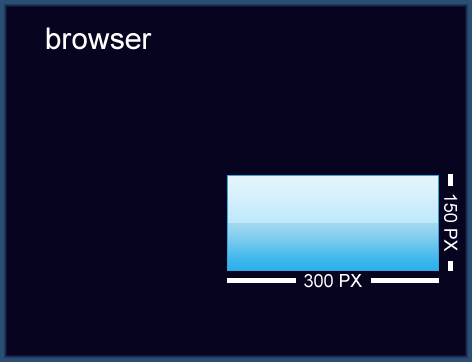
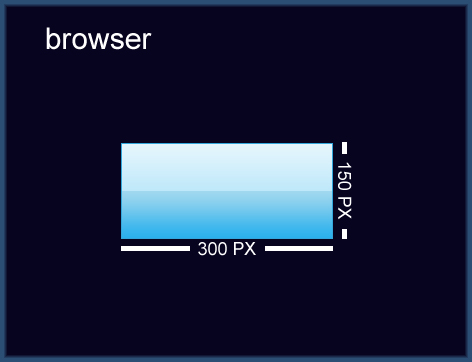
In order to get the image exactly centered, it’s a simple matter of applying a negative top margin of half the images height, and a negative left margin of half the images width. I updated my CSS with:
.centered {

position: absolute;

top: 50%;

left: 50%;

margin-top: -75px;

margin-left: -150px;

}
Here is the final product:
A better way to do this would be to set the margin of the div to margin: 0 auto; That automatically centers the object horizontally inside of it’s container, regardless of width. Then just use what you did to center vertically. This way, if the size changes all you have to modify is one value.
Pingback: Tweets that mention CSS Trick: How To Center an Object/Image Exactly In The Center of Browser « My Guy Solutions – Web development, PHP, Web Design, E-Commerce, Colorado Springs, Denver -- Topsy.com
“position:fixed” don’t work with Internet Explorer 6. (Yes, there’re still people who use it, unfortunately…)
.centered {
position: absolute;
top: 50%;
left: 50%;
margin-top: -75px;
margin-left: -150px;
}
both them dont work in moz!!! i dont know why? …
Helpful post, Thanks
Excellent post. Many thanks. You should keep posting.
>>>don’t work with Internet Explorer 6. (Yes, there’re still people who use it, unfortunately…)
Well, balls to them.
very good post.