With the Apple Tablet the iPad arriving it is time to finally learn how to give your web site an icon for Apple touch devices. Have you visited a website on an iPhone or iPod touch and attempted to tap Add to Home Screen only to be disappointed by the results? Years ago the favicon.ico was only found on a few select websites, but today they can be found just about everywhere. The apple-touch-icon rel link attribute has become Favicon 2.0 in today’s web.
This time stay ahead of the curve and learn how to add an icon for your website to an Apple touch device.

By default instead of getting a nice shiny icon, the iPhone will shrink down the homepage of that site and save the capture as the webclip. It is surprisingly simple to create a custom Apple touch icon for your website in two quick steps.
Create the Apple Touch Icon/Webclip
Fire up any image editor available and create an image that is 57×57 pixels large. Save the image in the root folder of your website or wherever it will reside. Do not worry about trying to apply the glossy effect the image. Safari will automatically composite the icon with the standard “glassy” overlay so it looks like a built-in iPhone or iPod application.

I can confirm that both PNG and JPEG image formats will work.
link rel=”apple-touch-icon”
To apply the webclip to the website simply open the document you wish to apply the icon and apply a link tag in the head of the document:
<head>

<title>My Guy Solutions</title>

<link rel="apple-touch-icon" href="/image_name.png"/>

</head>
Once complete make sure the modified files are placed on your web server.
Refresh the page on your iPhone and tap on the “+” symbol along the bottom of the screen. Tap on Add to Home Screen and you will see a preview:
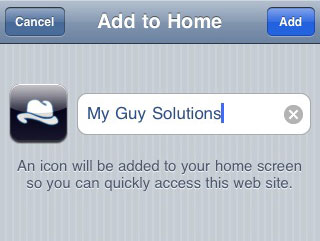
Congratulations you now will now give your visitors a clean icon when they bookmark your site to their home screen.
Pingback: designfloat.com
Works like a dream … thanks!
Perfecto. Looks awesome. I was wondering about the dimensions on this for the iPad. Thanks so much!
Does anyone know how I add that rel tag to a Joomla website?
Thanks!
Thanks for the tip!
It kept me up all night building icons. B^)
@Sarah – I just did the same thing with a number of Joomla sites…
Just go into the template manager and edit the html in the header section. Just make sure the rel link points to the place you’ve actually uploaded the icon file.
great work,,,thanks:)
Great, Thank you for explaining it such detail. There is a place where you can create( not really create but to polish it to some degree) and host you icon for free.
http://www.iconj.com/
Thx for sharing. Exactly what I was searching for to clean up the ugly page snippet that is created by default in Safari.
thanks for this nice solution.
nice guide.
common ip address
IP address can be used to change the name of the Wi-Fi, control the number of devices that are connected at a time to the network and much more.
IP address can be used to change the name of the Wi-Fi, control the number of devices that are connected at a time to the network and much more.